Sunday, August 9, 2015

How to remove Microphone Background Noise on the fly Adobe Audition

For months I was looking for good noise reduction and finally I found it.

Before doing anything, make sure few things first.
To reduce noise, PC have to be grounded.
Microphone need good cable and connection to the sound card.
Sound cards are allot better than on board audio so if you can, use them.

You will need:
Adobe Audition
Virtual audio cable
OBS for recording.

(Don’t use pirated versions but I cannot stop you from doing so, so it’s up to you)
OBS you can download it here : https://obsproject.com/
Open Broadcaster Software is free and open source software for video recording and live streaming.


Now lets get started.

Short video explaining quickly what to do, if you need more in depth guide, continue reading.


Virtual Audio Cable will make link between Adobe Audition and OBS. This will enable you to record modified audio from your microphone (reduced noise, added effects etc.).

First open Adobe Audition and click File/New/Multitrack Session like this:


Now click R (Arm For Record) and I (Monitor Input) on your track like this:


Now click on Input/Audio Hardware like this:


In Audio Hardware choose your microphone like this:


Output leave default speakers so you can hear the noise and adjust sound levels, effects etc. Later you will change output to Virtual Audio Cable and create link to OBS for your recording.

Latency you can change for your liking, nothing special about it.

Under "R" (Arm For Record) there is small button Sum to Mono (this is in case if you have Stereo Microphone in but using only one channel like I do) click this if you can hear your voice on only one speaker/headphones.

Now click in Effects Rack, Noise Reduction/Adaptive Noise Reduction like this:


In Adaptive Noise Reduction adjust options for your liking and choose High Quality Mode but this will impact your CPU so I do not recommend if you have slow CPU and doing some resource hungry tasks like video capturing.


Adobe Audition is basically done, you can add some other effects to your microphone if you wish.
Now lets connect it to OBS and record something.

Click on Input and choose Audio Hardware like this:


Change Default output to Virtual Audio Cable and click OK.


In OBS open Settings/Audio and in Microphone menu choose Virtual Audio Cable like this:


Now click Microphone Noise Gate, adjust Thresholds to further eliminate remaining Noise and you are done!


If you have questions or suggestions please comment I will be happy to answer.

Thank you for reading.


Saturday, August 1, 2015

Little update.
I just want to let you know that I'm still here.
Bought new SSD and installed new Windows 10.
I will be posting as soon as possible.

Best regards.

Wednesday, July 29, 2015

Super capacitor Flashlight

Flashlight without battery, last lifetime, no dangerous chemicals and recharging in few minutes!

Yes! It is possible.


Hello and thank you for visiting my blog.

Flashlight battery was dead so I decided to replace it with super capacitor. I didn't expect it to run longer than 4 hours, but it did. It exceeded all my expectations. Battery was replaced with 2 super capacitors  2.7 Volt 300 Farad and paired with Joule Thief.

Advantages are that I will never need to replace super capacitors, run time is same as with lead acid battery that it had before, no dangerous chemicals and I can charge it in few minutes.

I will continue to make improvements in the future.

For charging I use Apple charger and it is great but I have to connect it with open wires so it's not practical and since it's 5.3 volts I have to be careful not to overcharge super capacitors to avoid damaging them.
I ordered on eBay LM2596 Buck Step-down Power Converter Module DC 4.0~40 to 1.3-37V LED Voltmeter. You can check it out here: http://www.ebay.com/itm/400802470941 ( This is not ad :-) )
It will allow me to lower voltage to 2.5 volts, not charging over 100% capacity will last lifetime, and charge them with 2 amp constant current. Converter have short protection function and that will be useful when capacitors are at 100% empty.

Here is video of my new Super capacitor Flashlight V2


Assembly guide.


Now, I will explain in detail how I made it and what you need to replicate it.
Obviously you need to remove lead acid battery and make room inside flashlight for your capacitors.
Your flashlight will be different so think carefully where you will make space for capacitors.


Disconnect circuit for charging battery, switch and LED lights. LED lights will have 2 wires. Red and black/white. Red is positive and other is negative. Polarity is VERY important because if you charge capacitors in reverse polarity they can EXPLODE!
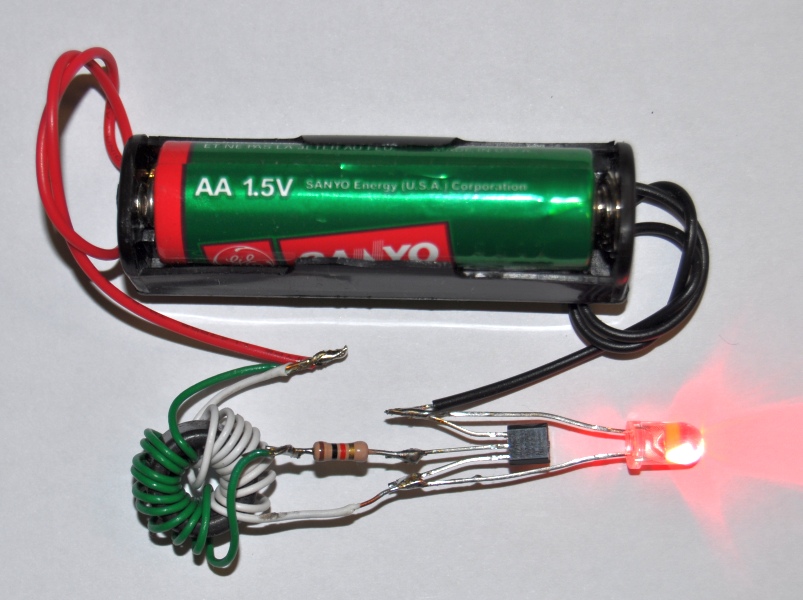
Solder capacitors together in parallel connection and wire/connector for charging. Like this:

Make sure to check again for polarity before soldering. After that, test the connection from capacitor and switch to LED lights and if all is ok you can solder capacitor and switch.

Now, it's time to make a Joule Thief.

Eexample:


Here is video if you are a beginner or really don't know what to do:


Now that you have Joule Thief you can connect it to switch and capacitor and test everything if it works. If everything is fine and working as it should, you can assemble you modified flashlight.

Congratulations! You have successfully modified your LED flashlight.

I'm Back!

I just want to let you know that I will write blog about interesting stuff that I make or see around. Here you will see videos, pictures, tutorials and other cool stuff. Also expect something interesting from Thailand since I stay here quite a while. I'm back :)

Saturday, January 28, 2012

How to make 3D video for Youtube

Hello.
I will try to explain what you need to do to get best possible quality for You tube 3D videos .
From beggining my advice is, do not go lower than 720P ( 1280X720 ) resolution.
I don't know when but You tube changed the bitrates and now HD looks little better.
FullHD 1080P ( 1920X1080 ) is AVC 6000+ Kbps with audio 152 Kbps.
I recomend to encode video to 6500 Kbps with audio 160Kbps.
This way you will have best possible quality after You tube reprocess the video.
You can make 720P ( 1280X720 ). Format is the same.
Only diference is video, reprocessed to 2800+ Kbps.
But i would not recomend it. Let me explain why.

3D video requires 2 cameras. One for the left and one for the right eye.
So, if you want FullHD 3D that means that we will have video that is big 3840X1080 pixels.
You tube do not support that format and now, what we need to do?
We need to split FullHD format in half.
There is 2 option, Over/Under or Left/Right.
Personally I choose Over/Under simply because i have 3D camera that records interlaced video.
Interlaced video is only 1920x540 pixels. By that logic i do not "lose" any pixels.
Only higher compression on You tube.
You can go with any of this 2 formats you prefer.

Some pictures and examples:

Formats:

Side L/R

Over/Under


Bit rates:


And video for example:

Saturday, January 7, 2012

3D Extreme

This is BIG news!!!
From now i will start to make 3D videos more frequently.
I'm finally able to properly edit 3D video file from my camcorder.

If you are interested please check out my Youtube channel:
http://www.youtube.com/user/dinosabanovic69